Action : 处理同步操作或异步操作
# 基本用法
- 首先,我们在
actions中定义两个函数
// useMainStore.js
import { defineStore } from 'pinia'
export const useMainStore = defineStore('main', {
    // state
    state: () => {
        return {
            name: 'JunQiu',
            age: 20,
            count: 10
        }
    },
    // getters
    getters: {
        doubleCount(state) {
            return (num) => {
                return state.count * num
            }
        }
    },
    // actions
    actions: {
        increment() {
            this.count++
        },
        randomizeCounter() {
            this.count = Math.round(100 * Math.random())
        },
    }
})
- 将函数导入到要使用的组件中
// App.vue
<script>
    const { increment, randomizeCounter } = useMainStore();//这里还属性的导入有所差别
</script>

<template>
  <img alt="Vue logo" src="./assets/logo.png" />

  <h1>useMainStore</h1>
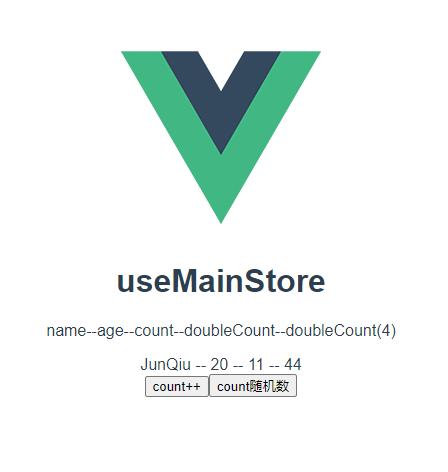
  <p>name--age--count--doubleCount--doubleCount(4)</p>
  <span> {{ name }} -- {{ age }} -- {{ count }} -- {{ doubleCount(4) }} </span>
  <br />
  <button @click="increment()">count++</button>
  <button @click="randomizeCounter()">count随机数</button>
</template>
这样就可以直接在页面中直接使用 actions 中定义的方法了
# 访问 getters 中的属性
在 actions 中 不管是访问 state 还是 getters 中的属性,都可以使用 this 获取
    // actions
    actions: {
        increment() {
            this.count++
        },
        randomizeCounter() {
            this.count = Math.round(100 * Math.random())
        },
        getDoubleCount() {
            this.count = this.doubleCount + 1
        },
        asyncSetName(){
            setTimeout(()=>{
                this.name = '李逵'
            },3000)
        }
    }
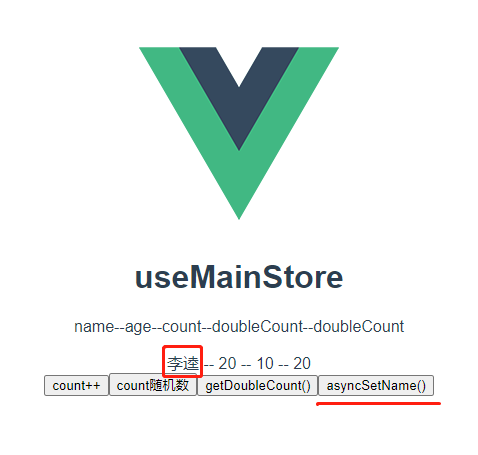
# 异步操作与传递参数
    // actions
    actions: {
        increment() {
            this.count++
        },
        randomizeCounter() {
            this.count = Math.round(100 * Math.random())
        },
        getDoubleCount() {
            this.count = this.doubleCount + 1
        },
        // 异步操作 、传递参数
        asyncSetName(name){
            setTimeout(()=>{
                this.name = name
            },3000)
        }
    }
// App.vue
<script>
const {
  increment,
  randomizeCounter,
  getDoubleCount,
  asyncSetName,
} = useMainStore();//这里还属性的导入有所差别
const { name, age, count, doubleCount } = storeToRefs(useMainStore());
</script>

<template>
  <img alt="Vue logo" src="./assets/logo.png" />

  <h1>useMainStore</h1>
  <p>name--age--count--doubleCount--doubleCount</p>
  <span> {{ name }} -- {{ age }} -- {{ count }} -- {{ doubleCount }} </span>
  <br />
  <button @click="increment()">count++</button>
  <button @click="randomizeCounter()">count随机数</button>
    <button @click="getDoubleCount()">getDoubleCount()</button>
  <button @click="asyncSetName('李逵')">asyncSetName()</button>
</template>